
Live
Design speed & fidelity
Fast, precise editing for harnesses and subsystem diagrams.

Wire Harness Design Software
Design your wire harness the way you want to build it.
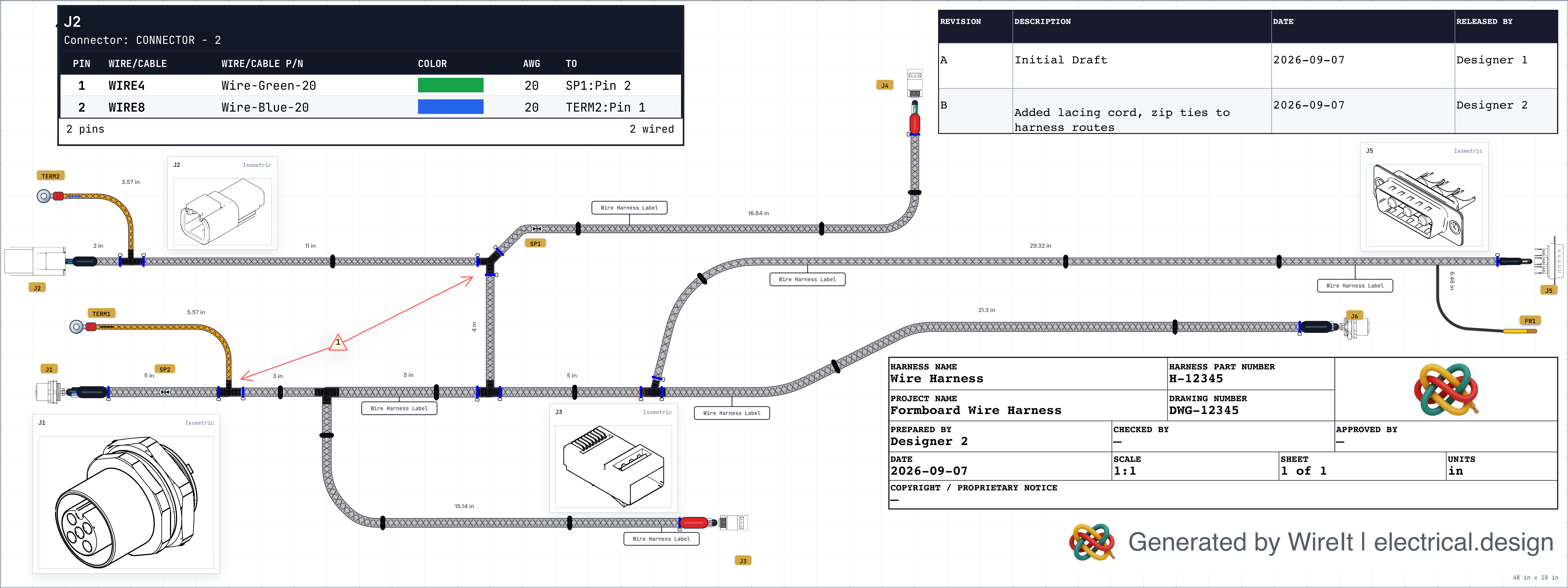
Create 1:1 scale Formboard layouts with bills of materials and cut lists that update as your design changes.
Cloud or on-premises deployment
No card required. Preview one project with up to 2 harnesses. Production exports require a paid plan.
Formboard wire harness design
FeaturesCore workflow
Create parts, connect them, lay out the harness, and export the files manufacturing needs.
Quick connector
Connect parts
Harness drawing
Bill of materials
Build package
Finished harness recap
After parts, wiring, tables, and production package, the same manufacturing view is ready to hand off.
Live Collaboration
Touch-drag a connector.
Robot Arm Harness
Your browser
Maya's browser
Alex's browser
Push electrical data into your Onshape assembly, route cables through the 3D enclosure, and sync measured lengths back. One source of truth — no tape measure required.
WireIt
Electrical
Wire lists · gauges · routing
3D lengths · slack values
Onshape
3D MCAD
Wire lists, gauges, and connector mappings flow from WireIt into your Onshape assembly through a direct API integration.
Path harness bundles through your enclosure using Onshape Wire features — real clearances, real bends, real geometry.
Measured 3D cable lengths flow back into WireIt. Cut lists and BOMs update with actual routed distances — no tape measure.
Import Existing Work
Start from the work you already have.
In use
"Trusted by engineers shipping real-world systems. WireIt is now powering real-world electrical designs."
Electrical model → Harness layout → Shop packet → Revision control
Fast, precise editing for harnesses and subsystem diagrams.
Round-trip sync with Onshape — push wire data to 3D, route cables, sync actual lengths back.
Sourcing intelligence woven directly into design decisions.
Manufacturing packages that match the canvas, every time.
Live cursors, shared reviews, and safer team edits.
From part definition to harness drawing, each view stays connected to the same source.
Create reusable devices, connectors, cables, and terminals.
Connect nets, assign conductors, and preserve electrical truth.
Turn logical connectivity into a fabrication-ready harness layout.
Review BOM, cutlist, and pin-level manufacturing data.
Export drawings, notes, and revision-ready manufacturing evidence.
Short answers, real guardrails. Reach out if you need a deeper dive.
Wire harness design software is a specialized engineering tool for creating, documenting, and managing electrical wiring harness assemblies. Unlike general-purpose CAD, it understands connectors, pin assignments, wire gauges, signal routing, and the manufacturing documentation needed to prepare harnesses for review.
Engineers use wire harness design software to generate schematics, bills of materials, wire cut lists, connector pinout diagrams, and harness topology drawings — replacing error-prone spreadsheets and disconnected tools with a single source of truth that stays accurate from first concept through factory handoff.
WireIt is wire harness design software for engineers who need clearer handoff outputs without weeks of manual documentation. Design your electrical system, and WireIt keeps BOMs, cut lists, and connector pinout tables aligned as you work. Teams can also start from existing KiCad or Altium work and bring in existing wire lists before moving into BOMs, cutlists, and documentation packages. With round-trip 3D integration through Onshape, you can push wire data into your MCAD assembly, route cables in 3D, and sync actual measured lengths back into WireIt.
WireIt supports both cloud and on-premises deployment including air-gapped environments. Whether you are a solo engineer or an enterprise team, WireIt scales from single-sheet designs to complex multi-harness systems with cross-sheet net management and real-time design rule checking.
Teams rarely start from a blank page. WireIt helps bring existing KiCad, Altium, and wire-list work into WireIt designs.
Start with a real project in minutes. Move to Basic when you need production exports or expanded use.
No card for Free Preview. One project with up to 2 harnesses included; production exports and expanded use require Basic.