
Wire Harness Design Software for Manufacturing Handoff
Design harness drawings, define connector pin tables, keep BOMs and wire cut lists tied to the design, and prepare manufacturing handoff documents in one workflow.
No card for Free Preview. One project with up to 2 harnesses included; production exports and expanded use require Basic.
Harness design
Draw the harness structure, branches, connectors, and electrical context.
BOM
Keep part rows tied to the design state instead of a separate spreadsheet.
Cut list
Generate wire preparation data with lengths, gauges, colors, and terminations.
Connector pin tables
Document cavities, pin assignments, and connector-facing review details.
Manufacturing handoff
Prepare release documentation and exportable production context from the same workflow.
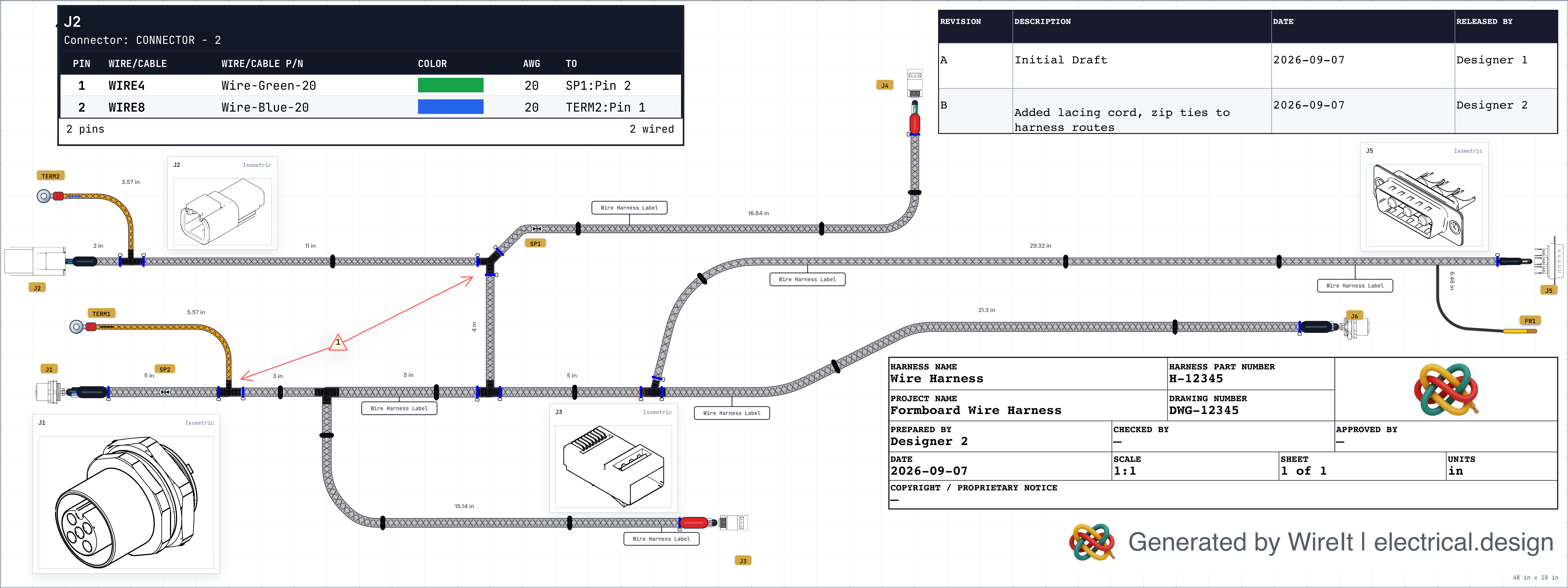
Harness proof
WireIt turns harness work into inspectable design and handoff output.
Routed branches, connector tables, callouts, BOM context, and production notes live together in one manufacturing-ready view.
Evaluate the full harness workflow
Use this page when comparing wire harness design software, wire harness CAD software, drawing tools, and cable harness workflows. Start with whether the tool can create harness drawings, keep connector pin tables, BOMs, and cut lists in sync, and produce manufacturing handoff documentation.
What Electrical Teams Need from Wire Harness Software
Wire harness design software is a specialized category of ECAD (Electrical Computer-Aided Design) tools purpose-built for creating, documenting, and managing electrical wiring harnesses. Unlike general-purpose CAD software or spreadsheets, dedicated wiring harness software understands the unique requirements of electrical system design.
A wire harness (also called a cable harness, wiring loom, or cable assembly) is an organized set of wires, cables, and connectors that transmit electrical signals and power throughout a vehicle, aircraft, machine, or electronic device. Designing these systems manually is time-consuming and error-prone—a single wrong wire length or mismatched connector can cause costly manufacturing delays or field failures.
Modern wire harness design software like WireIt connects the tedious aspects of harness engineering: generating Bills of Materials (BOM), calculating wire lengths for cut lists, validating pin assignments, and producing manufacturing documentation from the same workflow.
Whether you are designing a custom automotive harness, a motorsport wiring system, or an aerospace cable assembly, professional wiring harness software gives the team a shared place to design, document, review, and prepare the handoff package.
If you need practical proof points first, compare WireIt against spreadsheet-based harness workflows and use the free tools hub and glossary.
Key Features of Professional Wire Harness Software
WireIt provides the essential capabilities electrical engineers need to design, review, and document wiring harnesses efficiently.
Harness Drawing Canvas
Create wire harness drawings with routed branches, components, connectors, and reviewable electrical context in one workspace.
Automated BOM Generation
Bill of materials updates automatically as you design. Track part numbers, quantities, and manufacturer details without separate BOM entry.
Manufacturing Handoff Cut Lists
Generate wire cutlists with lengths, gauge specifications, color codes, and termination details for manufacturing review.
Connector Pin Tables
Define connector pinouts with pin mapping, cavity assignments, and mating-pair review before handoff.
Design Review
Review your designs before manufacturing. Identify missing connections, verify connector assignments, and catch errors early.
Import Existing Design Data
Bring forward existing KiCad, Altium, or wire-list work and continue from a controlled starting point.
Bring existing design data forward when the workflow needs it
Teams often begin with upstream design work or spreadsheet wire lists, not a blank canvas. WireIt gives those starting points a review-first path into harness documentation after the core design, BOM, cut list, and connector-table workflow is clear.
Bring in existing KiCad work
Start from upstream design work instead of recreating the project by hand.
Bring in existing Altium work
Move from upstream board work into harness documentation without starting over.
Bring in existing wire lists
Turn legacy spreadsheet-driven work into organized harness documentation.
Why Electrical Teams Choose WireIt
WireIt combines powerful capabilities with an intuitive interface, making professional wire harness design accessible to engineers at every level.
The WireIt Advantage
Purpose-Built for Harness Design
Not a generic CAD tool with harness features bolted on—every feature is designed for electrical harness engineering.
Browser-Based Workflow
Start in a browser-based workflow, then expand into production exports and team review as the project matures.
Cloud-Based Flexibility
Access your designs from anywhere. No software installation, automatic updates, secure cloud storage.
Free Preview and Paid Plans
Start in Free Preview, then move to paid plans when production exports and expanded use are needed.
Traditional Methods vs. WireIt
| Feature | Spreadsheets | WireIt |
|---|---|---|
| BOM Updates | Manual, error-prone | Automatic, real-time |
| Wire Lengths | Copy-paste errors | Calculated from design |
| Review Checks | Manual review only | Automated checking |
| Version Control | File naming chaos | Visual diff & rollback |
See WireIt in Action
Experience how WireIt connects harness drawings, connector pin tables, BOM generation, cut lists, and manufacturing documentation.
Loading…No card for Free Preview. One project with up to 2 harnesses included; production exports and expanded use require Basic.
Frequently Asked Questions
Common questions about wire harness design software and WireIt.
Ready to Modernize Your Wire Harness Design?
Move from spreadsheet drift into professional wire harness design software. Start in Free Preview, then move to Basic when you need production exports and expanded use.
No card for Free Preview. One project with up to 2 harnesses included; production exports and expanded use require Basic.